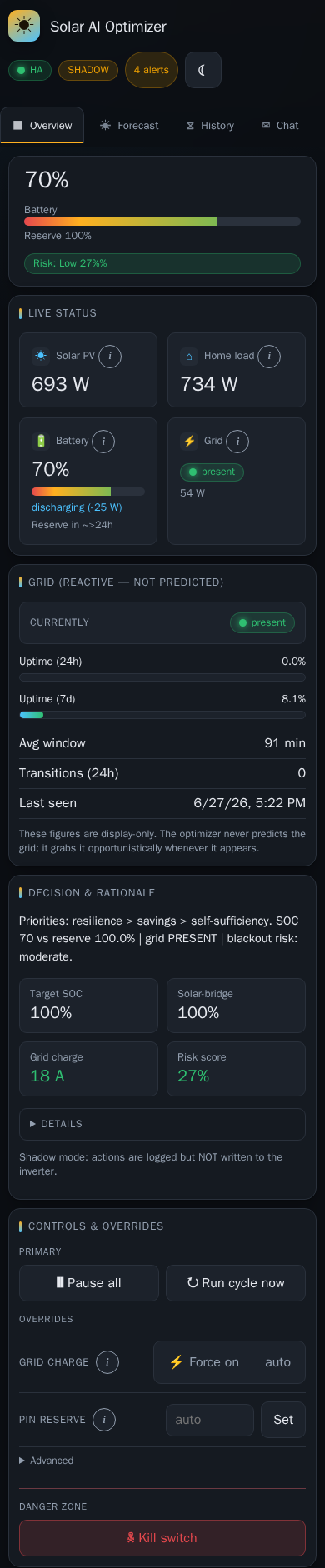
Mobile ingress QA (Home Assistant Companion)
Use this checklist when validating the dashboard inside the HA Companion app ingress iframe (native add-on or hass_ingress).
Setup
- Open Solar AI from the HA sidebar on a phone (iOS and/or Android Companion app).
- Test both admin and viewer accounts if possible.
Layout and scrolling
- [ ] No double vertical scrollbar (HA chrome + app content scroll together naturally).
- [ ] Topbar stays sticky; content does not sit under the device notch.
- [ ] Bottom content and toasts clear the home indicator / HA bottom bar.
Navigation
- [ ] Main tabs scroll horizontally when needed; labels remain visible (not icon-only).
- [ ] Tab buttons are easy to tap (roughly 44px tall).
- [ ] History sub-tabs (Chart, Decisions, Grid events, …) scroll horizontally on narrow screens.
Status bar (≤600px width)
- [ ] Primary pills visible: HA, LIVE/SHADOW, PAUSED (when active), VIEWER (when applicable).
- [ ] Secondary alerts collapse into an N alerts menu; menu opens and lists items.
- [ ] Theme toggle remains reachable.
Content panels
- [ ] Overview cards stack in a single column.
- [ ] History chart renders at reduced height; legend readable.
- [ ] History tables scroll horizontally without breaking the page layout.
- [ ] Info tips (ⓘ) open on tap and dismiss on outside tap or Escape.
- [ ] Overrides segmented controls are tappable.
- [ ] Assistant chat input stays above the keyboard / safe area.
Settings
- [ ] Nav jump scroll does not hide section titles under the sticky topbar.
- [ ] Desktop settings sidebar stays below the app topbar while scrolling.
- [ ] Mobile category pills and subsection strip scroll horizontally; active section highlights while scrolling.
- [ ] Settings search hides category/subsection pills and shows cross-category matches.
- [ ] Agent access (MCP) section shows status pill; misconfigured state is visible when enabled without a token.
- [ ] Save bar stays visible and respects the bottom safe area.
Regression (desktop)
- [ ] Standalone
http://localhost:8000and desktop ingress in HA sidebar still look correct at 1280×900.
Automated screenshots
With the demo stack running:
docker compose --profile docs run --rm docs-screenshots
Or locally from frontend/ after one-time npm ci and npx playwright install chromium:
npm run docs:screenshots
Mobile captures (390px wide, content height) are written to docs/images/frontend/mobile-*.png.